Keystatic: easy website content edits,
keystaticcmswebsitesgit
Updating a website should not require finding the right source file, remembering its format and hoping a misplaced character does not break the build. But making editing easier should not mean giving up ownership of the content.
Keystatic offers a useful middle ground: editors work with labelled fields and a rich-text interface, while developers keep the content schema, website code and repository-managed assets together in Git. In the GitHub-backed setup described here, there is no separate content database to operate.
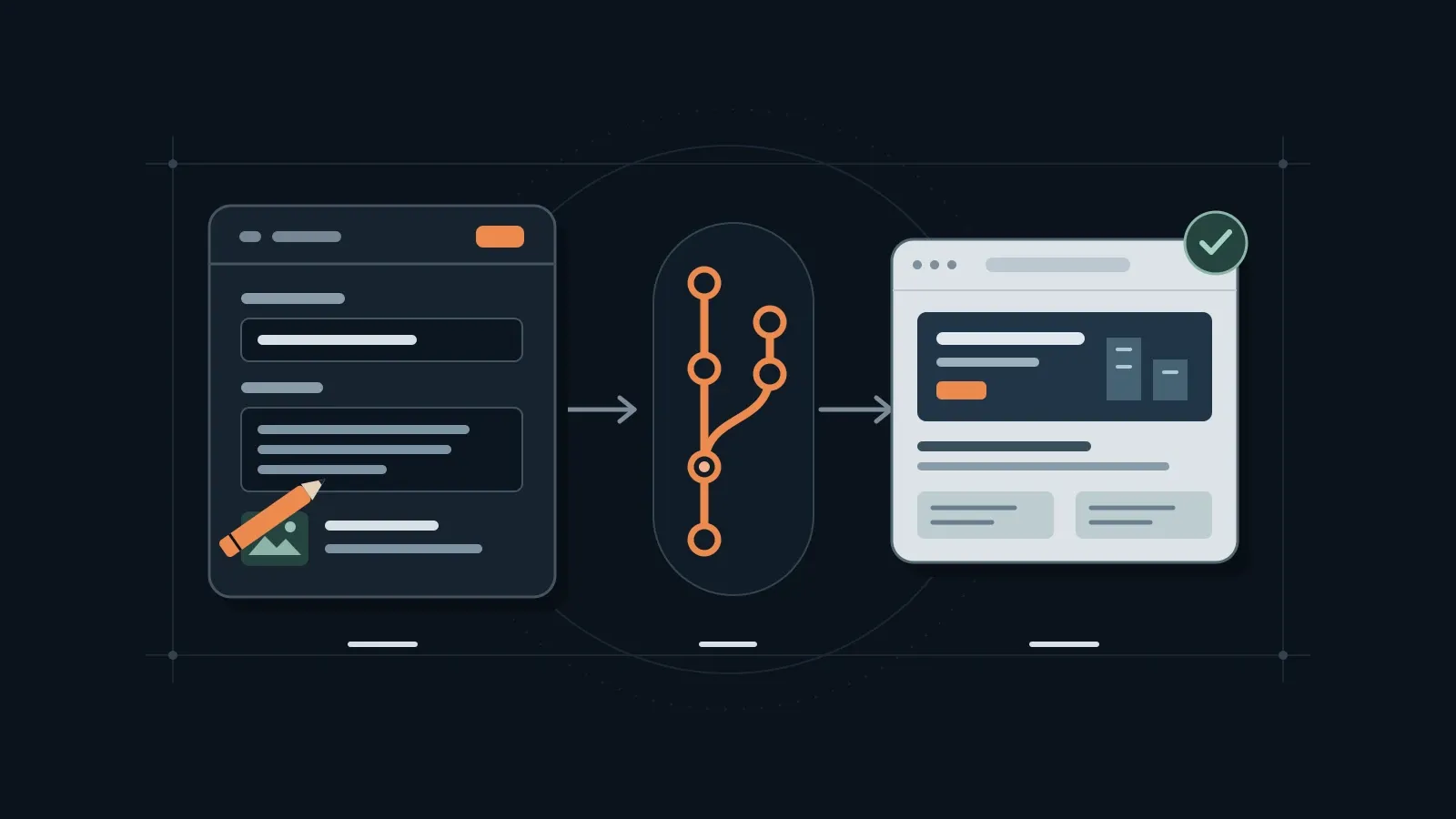
The important distinction is this: editing the content and serving the website are different jobs. Keystatic can provide the editing experience while visitors receive prebuilt pages from a static host. A successful save creates a commit; a successful deployment makes that change public.
This is a generic architecture guide, not a claim that every hosting combination below has been tested, or a change to this site’s CMS.
One repository, two very different audiences
Editors need understandable controls: a title, an image picker, a caption, perhaps a small set of approved page layouts. The schema defines those controls and the shape of the saved files. It can reduce accidental formatting mistakes, but developers still need build-time validation and sensible rendering defaults.
Developers need changes they can inspect and reproduce. With GitHub storage, edits become commits in the repository. That provides history, diffs, branches and the option of review before publication. Content can be moved to another host or consumed by another renderer without exporting it from a proprietary content database. Changing CMS still takes work: schemas, rich-text formats and custom components are not automatically interchangeable.
For the business, the benefit is a clearer ownership model. Keep the repository, GitHub App, hosting accounts and billing under the organisation’s control, with named maintainers and a documented recovery path. Owning files is helpful; knowing who can publish and who fixes a failed build is just as important.
Architecture: visitors do not need the CMS
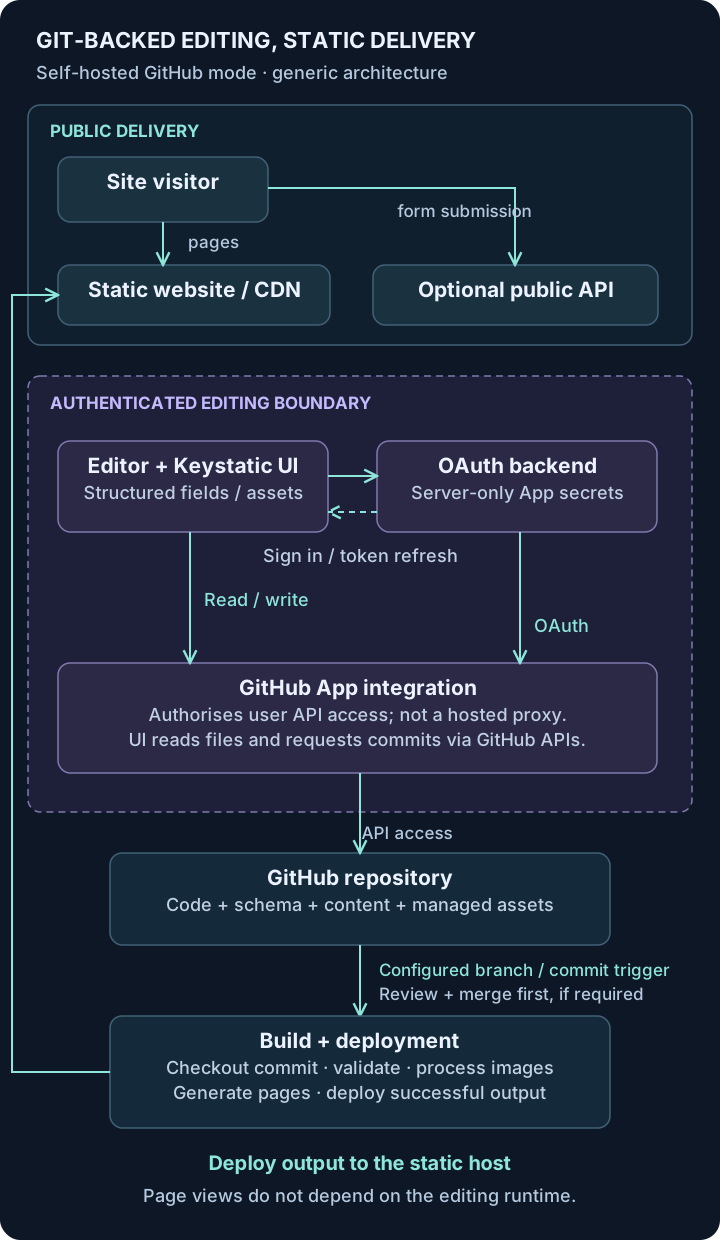
There are four responsibilities to keep separate:
- Public static website: generated HTML and optimised assets served by a CDN/static host. Page views do not call Keystatic or read GitHub. An editing-service outage need not take down the already deployed site.
- Optional public API functions: endpoints for features such as an enquiry form. They validate public requests, apply abuse controls and use their own secrets. They are not Keystatic’s login or repository-write API.
- Authenticated editing service: the Keystatic editor UI plus server-side routes for GitHub authentication and token management. It needs a compatible runtime, even if the public website does not.
- Build and deployment system: checks out a specific commit, validates and transforms content, processes images, builds the website and deploys the output. Pin dependencies and build configuration to make builds reproducible; Git alone does not guarantee that.
Where the GitHub calls actually happen
It is tempting to draw a chain of “editor → CMS backend → GitHub App server → repository”. That suggests a proxy service that does not exist.
The GitHub App is a registered authentication and authorisation integration. In the self-hosted GitHub implementation inspected for this guide, the backend performs the OAuth code exchange and token refresh, while the authenticated browser UI calls GitHub’s APIs to read repository content and create commits. The UI uses a user access token; GitHub applies the App’s granted permissions and the user’s repository access. The backend also calls GitHub for authentication/token operations, not as a universal content proxy.
These details are visible in Keystatic’s official source: OAuth routes, authenticated API client, repository reads and commit mutation. Check the implementation again when upgrading rather than designing around an assumed proxy.
App credentials are not editor access tokens. The client secret and Keystatic authentication secret must stay server-side. The current UI needs access to the signed-in user’s access token, so it would be inaccurate to say every token is server-only. Protect the editing origin with HTTPS, appropriate security headers and no untrusted scripts; do not log tokens or copy them into content, static output or analytics. Never expose a local-filesystem editing server as a public CMS.
From opening an entry to publishing it
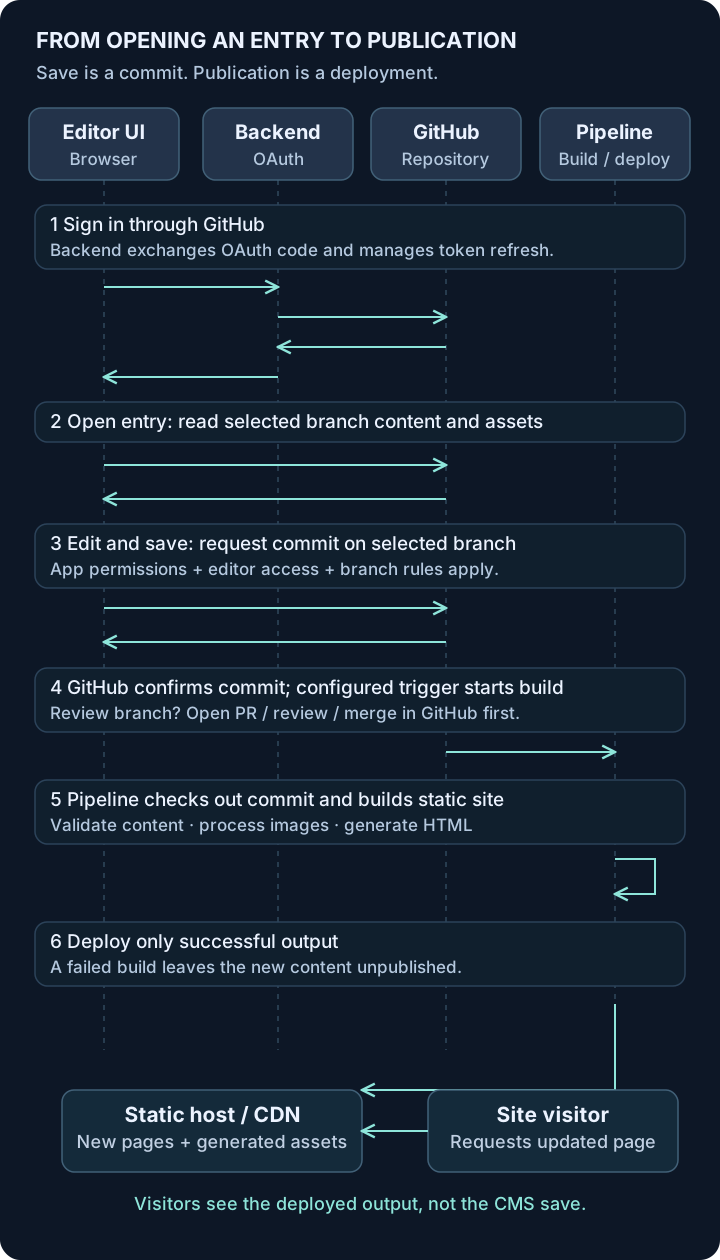
Opening an entry reads the selected branch’s files and assets from GitHub into the editor. Saving in GitHub mode writes the changed files in a commit on that branch. It does not directly replace the page on the CDN.
Choose a publication policy deliberately:
- Direct publication: a save on the production branch triggers its configured build. This is simple, but repository permissions and branch rules must allow it, and editors need to understand that a successful deployment publishes their change.
- Reviewed publication: editors use a content branch, a pull request is reviewed in GitHub, and merging into the production branch triggers deployment. Keystatic supports branch selection and creation; its optional
branchPrefixlimits which branches appear in the UI. It is not a replacement for GitHub branch protection or a complete editorial approval system.
Preview deployments are a host/build configuration, not a guaranteed consequence of installing Keystatic. An unsaved editor preview is also different from a built branch preview. Keystatic documents a separate Next.js draft-mode preview recipe; that requires additional implementation and authenticated preview handling.
For concurrent edits, agree on who is working on an entry. The inspected implementation detects an entry changed since it was opened and can require a new branch rather than silently overwriting it. Git history helps resolve conflicts; it does not make all collaboration conflict-free.
Setting up self-hosted GitHub editing
The official GitHub-mode guide is the starting point. First install the appropriate Astro or Next.js integration so /keystatic and its server routes exist. The following is a minimal, anonymous example for a separate project, not configuration to add to this website:
import { collection, config, fields } from '@keystatic/core';

export default config({
  storage: {
    kind: 'github',
    repo: { owner: 'example-team', name: 'website' },
  },
  collections: {
    pages: collection({
      label: 'Pages',
      slugField: 'title',
      path: 'src/content/pages/*',
      schema: {
        title: fields.slug({ name: { label: 'Title' } }),
        summary: fields.text({ label: 'Summary', multiline: true }),
        image: fields.object({
          src: fields.image({
            label: 'Image',
            directory: 'src/assets/images/pages',
            publicPath: '/src/assets/images/pages/',
          }),
          alt: fields.text({ label: 'Image description' }),
          caption: fields.text({ label: 'Caption' }),
        }),
      },
    }),
  },
});
The schema must match the website’s content loader and renderer. Rich text can be added with Markdoc or MDX fields and their corresponding rendering integration; a CMS config alone does not generate public pages.
1. Create the GitHub App through onboarding
Run the project locally, open /keystatic and choose the GitHub connection/setup flow. Supply the intended deployed editing URL and organisation owner where applicable. Keystatic’s App creation flow generates the registration settings; use that instead of guessing a generic OAuth App configuration. A GitHub App and a GitHub OAuth App are different registrations.
The current official onboarding manifest requests these repository permissions:
| Permission | Level | Purpose |
|---|---|---|
| Contents | Read and write | Read files/assets and create content commits |
| Metadata | Read | Basic repository information |
| Pull requests | Read | Read pull-request information for branch/review context; this is not permission to merge |
Install the App on the intended repository, preferably selecting only the repositories it needs. Organisation policy may require an owner to approve installation. Editors in this self-hosted setup need GitHub accounts with write access to the repository, as the Keystatic guide specifies. Installing the App does not grant every visitor permission to edit, and App permissions do not bypass branch protection.
2. Register the editing service’s callback URL
For a hypothetical service at https://edit.example.com, the user-authorisation callback is:
https://edit.example.com/api/keystatic/github/oauth/callbackThat is the editing origin, not the static site’s URL, and not /keystatic itself. Add it in the GitHub App’s settings under callback URLs before testing deployed login. The onboarding flow also registers local callbacks, including the current origin and a loopback callback; retain the generated values needed by your local setup rather than substituting a guessed port.
GitHub distinguishes an authorisation callback from an installation setup URL. Use explicitly controlled callback origins. Preview sites with changing domains need a deliberate authentication strategy; do not assume every preview URL will work with the production App.
3. Put configuration and secrets in the right environment
Onboarding generates a local .env. Keep it ignored by Git, then configure the deployed editing runtime:
| Variable | Where it belongs |
|---|---|
KEYSTATIC_GITHUB_CLIENT_ID |
Backend authentication configuration; an identifier, not a secret |
KEYSTATIC_GITHUB_CLIENT_SECRET |
Server-only secret for the App’s OAuth flow |
KEYSTATIC_SECRET |
Server-only authentication/encryption secret; keep stable across runtime instances |
PUBLIC_KEYSTATIC_GITHUB_APP_SLUG (Astro) |
Public App slug used by the integration; not a credential |
NEXT_PUBLIC_KEYSTATIC_GITHUB_APP_SLUG (Next.js) |
Next.js equivalent of the public slug; use the name for your framework |
Only the slug belongs in public-prefixed configuration. Never prefix either secret with PUBLIC_ or NEXT_PUBLIC_, embed it in static pages or commit it to Git. A generic GitHub App tutorial may discuss a private key, but this Keystatic onboarding flow uses the documented client ID, client secret and Keystatic secret; do not invent a private-key environment variable for it.
Ensure the framework/adapter actually supplies the server configuration at the phase where it is read. A runtime secret binding is not automatically the same as process.env in every serverless environment. Use the integration’s supported configuration mechanism and test it without printing secret values.
4. Verify access and publication separately
Test login with an intended editor, denial for a user without repository access, opening an existing entry, uploading a generic asset and saving to a non-production branch. Confirm the commit in GitHub, then confirm the expected preview/review/build path. Configure the production host’s branch trigger or CI workflow explicitly; the editing service and the static host do not need to be on the same provider.
Watch for branch rules or required checks that block direct writes, callback mismatches and build failures. A “saved” message is evidence of a content commit, not evidence that the production deployment succeeded.
Hosting: choose the static host and editing runtime separately
Static hosting serves the result of the build. The editing backend executes code during login and token refresh. Uploading static output to a host does not deploy that backend.
These are documentation-backed options and constraints, not a tested compatibility matrix:
| Role and option | Runtime, secrets and operational trade-offs | Build/preview considerations |
|---|---|---|
| Static site: Cloudflare Pages | CDN-hosted build output. No Keystatic secrets needed for public page delivery. Public Functions, if used, are a separate runtime concern. | Configure Git builds and branch previews. Do not confuse static Pages support with support for a current Astro editing adapter. |
| Static site: Netlify or Vercel | Both serve static sites; functions require the appropriate framework integration. Usage, bandwidth and build allowances vary by plan. | Git-connected builds and deploy previews can support review; protect previews containing unpublished material. |
| Static site: GitHub Pages | Static hosting, not a Node editing runtime. Put Keystatic elsewhere or edit locally. | Configure an Actions deployment/build workflow; do not assume per-branch preview environments. |
| Static site: object storage + CDN | Suitable for generated files. Configure TLS, routing, cache invalidation and deployment access yourself; storage and transfer are not universally free. | CI must build and upload output. Preview prefixes/domains and cleanup are your responsibility. |
| Editing: compatible Node host | A Node framework adapter is the most direct match for Keystatic’s documented server requirements. Manage HTTPS, secret injection, updates, logs and availability. | Can be co-located with the site or deployed separately. Set the editing origin’s callback, not the CDN origin’s. |
| Editing: Node serverless on Netlify/Vercel | Use the provider’s supported framework adapter and Node runtime, not a static-only export or assumed edge-runtime compatibility. Verify authentication cookies, secrets and runtime limits. | Preview support is useful, but preview credentials, callbacks and repository write access need an explicit policy. |
| Editing: Google Cloud Run | A compatible Node build can run in a container. Own the image, patches, service access, secret configuration, scaling and cold-start/cost trade-offs. | Deploy the editing container independently; repository commits still need a separate site-build trigger. |
| Editing: Cloudflare Workers, conditional | The framework adapter must target Workers, and the exact Keystatic version, Node API usage and environment configuration must be compatible. Node compatibility flags alone do not prove this. | Verify deployed login, refresh, read and save before choosing it. No end-to-end Workers/Keystatic configuration is asserted as tested here. |
Provider references: Pages static Astro hosting, Netlify’s Astro guide, Vercel’s Astro guide, GitHub Pages’ static-hosting scope and S3 website hosting. For object storage, a CDN can provide HTTPS; the S3 website endpoint itself does not support it.
For an Astro editing service, Keystatic’s integration guide requires an adapter and server-side Node APIs. Astro’s Node adapter provides a standalone server or middleware. A containerised standalone server on Cloud Run must follow the container contract, including listening on 0.0.0.0 and the injected PORT; that establishes the runtime shape, not proof of an end-to-end tested CMS deployment.
Workers deserve extra care. The current Astro Cloudflare adapter targets Workers and no longer supports Cloudflare Pages deployment. That does not prevent serving a separately generated static site on Pages. Workers offer partial Node API compatibility with nodejs_compat and a suitable compatibility date, but some APIs are partial or stubs. Check the exact dependency graph and how the integration receives secrets. An adapter existing is not proof that a particular Keystatic setup works.
Co-located or separate?
Co-location gives the website and editor one framework project/origin and fewer deployment configurations. Only the editing routes need runtime behaviour; public pages can still be prerendered. You must nevertheless deploy a server-capable build, protect the editor and ensure secrets never enter public output.
Separate deployments make the boundary more explicit: the editing service can run on Node while the public site stays entirely static on another provider. The static build can omit editor routes using a pattern such as Keystatic’s Astro production-disable recipe. This adds configuration to maintain: shared schema/content paths, compatible versions, an editing URL, and independent build triggers. Do not disable the routes in the editing deployment itself.
Neither choice eliminates maintenance. Budget for runtime usage, builds, repository storage, dependency updates, access reviews and somebody responding to failed publication.
Local mode, self-hosted GitHub mode and Cloud are different choices
- Local mode: the editor writes files on the local filesystem. A person still commits and pushes those changes. It suits developer-assisted editing and avoids operating a remote editing service; it is not a deployed multi-user authentication system.
- Self-hosted GitHub mode: you operate the UI/authentication backend and register the GitHub App described above. Editors need repository write access; hosting and maintenance remain your responsibility.
- Keystatic Cloud: optional managed integration with a different
storage: { kind: 'cloud' }configuration. It simplifies GitHub authentication without your own custom App setup and can allow editors without GitHub accounts. Team access, plan limits and optional products have their own costs. Cloud Images and experimental multiplayer editing are separate opt-ins, not capabilities to assume in the repository-image setup here.
Images: editor controls are not the website renderer
An image needs more than an upload button. Editors need to recognise the selected image and provide useful alt text or a caption. Visitors need an appropriately sized image with stable dimensions and accessible markup.
The earlier schema uses Keystatic’s image field for selection/upload and labelled text fields for alt text and caption. directory controls where the asset is saved; publicPath controls the stored reference. Here it is a build-time source reference, not a URL that visitors should request from the CDN.
For images inside rich text, a custom content component can offer the same structured controls and a restricted layout choice. For example, inside the configuration’s MDX or Markdoc field, register a block like this (with the required fields import):
import { block } from '@keystatic/core/content-components';

const components = {
  CaptionImage: block({
    label: 'Captioned image',
    schema: {
      image: fields.image({
        label: 'Image',
        directory: 'src/assets/images/pages',
        publicPath: '/src/assets/images/pages/',
      }),
      alt: fields.text({ label: 'Image description' }),
      caption: fields.text({ label: 'Caption' }),
      layout: fields.select({
        label: 'Layout',
        options: [
          { label: 'Contained', value: 'contained' },
          { label: 'Wide', value: 'wide' },
        ],
        defaultValue: 'contained',
      }),
    },
  }),
};
Pass components to fields.mdx({ label: 'Body', components }) or its Markdoc equivalent. An optional editor ContentView can preview the block; that preview is editor code, not a public-site component. The website must separately map CaptionImage to its renderer and implement the permitted layouts.
For the standalone image object in the first example, a minimal Astro rendering component can resolve the saved reference to a local asset at build time:
---
import { Image } from 'astro:assets';
import type { ImageMetadata } from 'astro';

type Props = { image: { src: string; alt: string; caption?: string } };
const { image } = Astro.props;
const assets = import.meta.glob<{ default: ImageMetadata }>(
  '/src/assets/images/pages/**/*.{jpg,jpeg,png,webp}',
  { eager: true },
);
const source = assets[image.src]?.default;
if (!source) throw new Error(`Missing content image: ${image.src}`);
---

<figure>
  <Image
    src={source}
    alt={image.alt}
    widths={[480, 960]}
    sizes="(min-width: 960px) 960px, 100vw"
    loading="lazy"
  />
  {image.caption && <figcaption>{image.caption}</figcaption>}
</figure>
The allowed source types and sizes here are illustrative. Set them for the real layout, validate required fields, and decide when an empty alt value is appropriate for a decorative image. Do not lazy-load a prominent above-the-fold hero by default.
This explicit lookup follows the same principle as Keystatic’s Astro image recipe and Astro’s dynamic image import guide: saved content references must resolve to image metadata before the renderer can optimise them. A content-collection image helper is another option for standalone fields.
The asset flow is editor selection/upload → repository asset plus content reference → commit → build-time image processing → generated image variants and HTML → CDN. In a prerendered Astro build, the frontend image pipeline produces static output. Keystatic supplies editing and storage controls; it is not that pipeline. The optional Cloud Images product is a different architecture.
The practical trade-offs
This approach works well when a team wants controlled content changes, a reviewable history and fast public pages, without a live content database on the page-view path. It is less comfortable when every change must be live immediately or a large editorial team needs complex roles and simultaneous editing.
Before adopting it, agree on:
- Publication ownership: who has repository access, who reviews changes, which branch publishes, and who sees a failed build alert.
- Time to publish: builds and image processing take time. Make commit and deployment status visible so editors know whether they are waiting or something failed.
- Asset limits: large originals and frequent replacements grow repository history. Set upload guidelines and consider external asset storage when repository size or clone/build time becomes a problem.
- Recovery: reverting a content commit still needs a successful build/deployment. Rolling back hosting output and reverting Git are different actions; keep them coordinated.
- Maintenance: update the CMS, framework and runtime; rotate/revoke compromised credentials; remove former editors; test login and saving after upgrades.
The strongest reason to choose Keystatic is not “a CMS with nothing to maintain”. It is an approachable editor backed by files you own, with a clear path from a reviewed change to a deployed website. Keep those boundaries explicit, and both the editing experience and the operational story become easier to understand.
If you are deciding how your team should edit a static website, talk to us about the content workflow first. The host is a choice that follows from that workflow, not the starting point.