For law firms and legal-service businesses — not a consumer wills service.
Custom legal intake and document automation for law firms.
Turn client instructions into review-ready documents. Collect the right answers, give practitioners a clear review queue, and prepare documents using your firm’s approved wording.
- Your practitioners control issue
- Your approved questions and clauses
- Your code, hosting and data
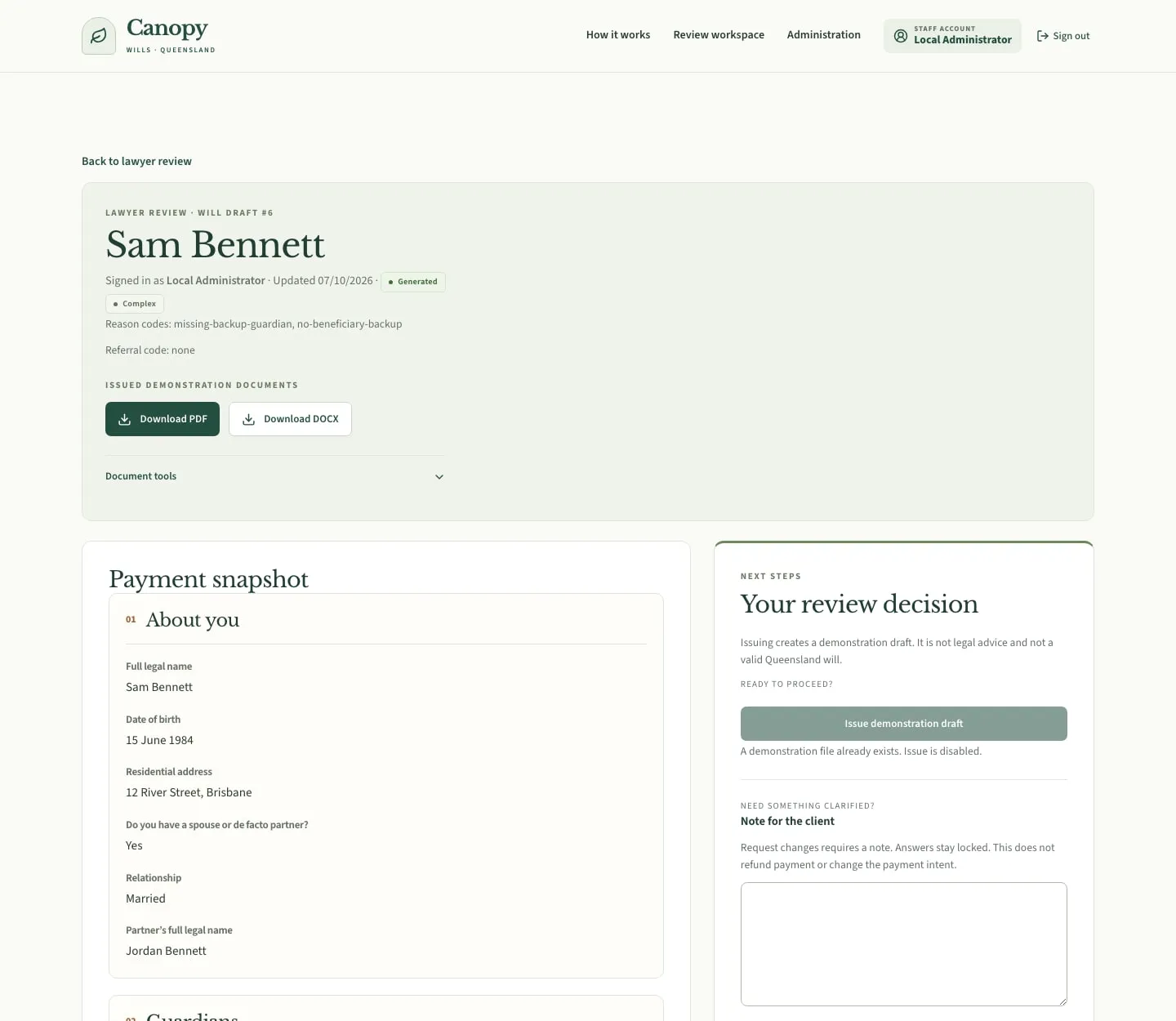
Practitioners review before issue
Explore the workflowFictional data only. Payment is simulated. Drafts are not legal advice or valid wills. This is a demonstration, not a production client deployment.
Working demonstration
Client submission, practitioner review, document delivery.
A guided questionnaire connected to a practitioner workspace and client downloads. Open any image to inspect it.
Fictional data only. Payment is simulated. Drafts are not legal advice or valid wills. This is a demonstration, not a production client deployment.
Step 1
Client submits instructions
Conditional fields collect relevant details. Signed-in clients can save and resume.
Step 2
Practitioners review before issue
Inspect submitted instructions and review flags before generating a demonstration draft.
Step 3
Documents are delivered
The client dashboard provides Word and PDF downloads after staff issue.
The public demo opens on the client-facing homepage. The walkthrough above shows submission, review and delivery.
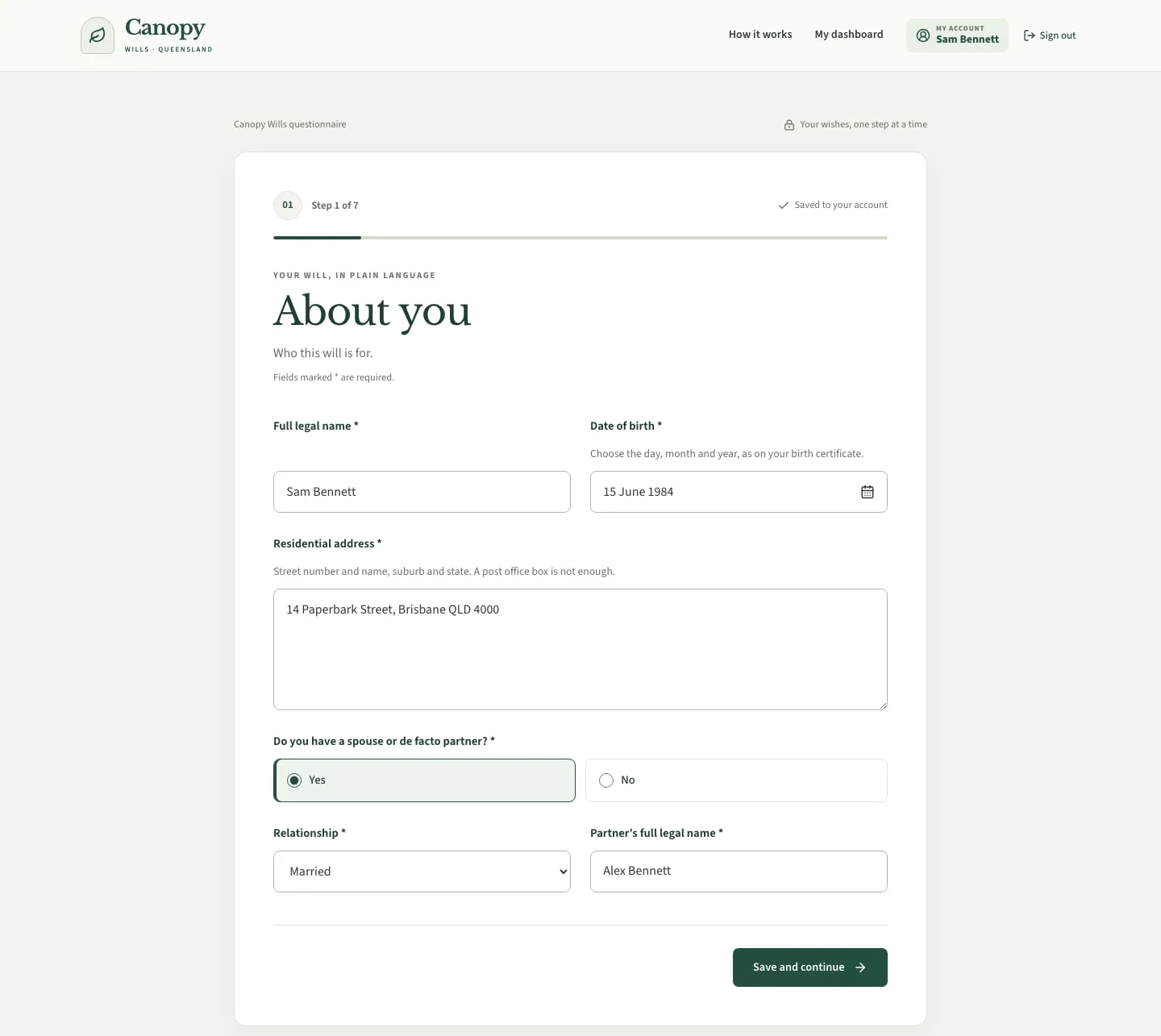
Client submits instructions
Why build this workflow
Less chasing. A clearer handoff.
Collect instructions once
Guide clients through relevant questions instead of piecing answers together from forms and email.
Keep review with the firm
Give practitioners structured answers and explicit issue controls. Software supports judgment; it does not replace it.
Control your content
Edit questions and demonstration clauses in the CMS. Your team approves the legal wording and rules.
Your first release
From $2,500 for a portal plus one workflow
This starts as a client and admin portal, with one document workflow on top. Further workflows are quoted separately.
Included from $2,500
- Client sign-in and a saved questionnaire
- An admin workspace to review submissions
- One workflow: conditional questions, review, and document generation from your approved content
- Handover of the agreed code on your own infrastructure
If the brief grows
- Each additional workflow
- Practice-system connections, corrections, and notifications
- Production document storage, backups, and privacy controls for real client information
- Legal-content approval and operational testing before a real-client launch
Investment
From $2,500 AUD for a client and admin portal with one document workflow.
Quoted once that first workflow is clear.
These figures are a rough guide, calculated from the lower range of full-stack and cloud engineering rates. We quote the exact fixed price once we understand what needs to be built. Each project is set up on your own infrastructure. You own the code. The work is accelerated with AI engineering and reviewed by a software engineer.
Before you decide
A few good questions.
Is Canopy Wills a live legal service?
No. It is a working software demonstration using fictional information and illustrative clauses. Do not enter real client details or rely on its documents as valid wills. OwnStack builds software, not legal advice.
What is simulated or unfinished?
Payment, vault, reminders and executor contact are mocks. The corrections loop is incomplete. Demo downloads may disappear on restart. Production storage, legal approval and privacy/security requirements must be scoped separately. The displayed $149 is a sample consumer price, not a development fee.
Can this use our firm’s wording and systems?
Yes, subject to an agreed scope. Your practitioners supply and approve the questions, clauses and review rules. Template formatting, practice-system access, integrations and the final fixed price are confirmed before development.
Workflow fit check
Which intake process slows your firm down?
Tell us what clients complete, what practitioners review, and which document follows. Use process descriptions only, not confidential client information.